Tools for download
FX Blue EACopy
EACopy simplifies the process of distributing new versions of .ex4 files across multiple instances of MT4. You simply put the new file(s) in one central place, and EACopy then transfers them into any number of different MT4 installations on your computer.
Download for Your Platform
Our installer, and also some of our individual tools, require v4.8 of the Microsoft .NET Framework. This may not be installed by default on some VPSes.
MT 4
EACopy simplifies the process of copying files into multiple installations of MT4. You can use it to copy an EA or indicator into multiple instances of MT4, or to copy .fxt files for backtesting, or to copy chart files or templates etc.
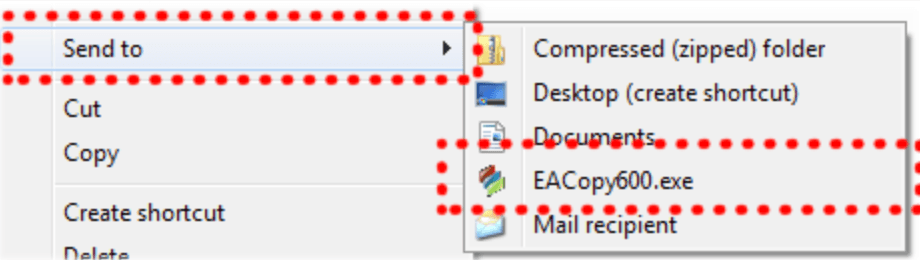
For example, you can copy an indicator or EA into multiple MT4 installations simply by right-clicking over it in Windows Explorer; choosing EACopy600 from the Send To list; and then choosing which installations of MT4 to copy into.
You can create stored lists of MT4 installations so that e.g. you can quickly copy files into either your demo MT4 installations or your live installations.
EACopy can also be used for distributing other types of files between MT4 installations: .fxt history data for backtesting, templates, symbol sets etc.
For example, you can copy an indicator or EA into multiple MT4 installations simply by right-clicking over it in Windows Explorer; choosing EACopy600 from the Send To list; and then choosing which installations of MT4 to copy into.
You can create stored lists of MT4 installations so that e.g. you can quickly copy files into either your demo MT4 installations or your live installations.
EACopy can also be used for distributing other types of files between MT4 installations: .fxt history data for backtesting, templates, symbol sets etc.
MT 5
EACopy simplifies the process of copying files into multiple installations of MT5. You can use it to copy an EA or indicator into multiple instances of MT5, or to copy chart files or templates etc.
For example, you can copy an indicator or EA into multiple MT5 installations simply by right-clicking over it in Windows Explorer; choosing EACopyMT5 from the Send To list; and then choosing which installations of MT5 to copy into.
You can create stored lists of MT5 installations so that e.g. you can quickly copy files into either your demo MT5 installations or your live installations. EACopy can also be used for distributing other types of files between MT5 installations: templates, symbol sets etc.
For example, you can copy an indicator or EA into multiple MT5 installations simply by right-clicking over it in Windows Explorer; choosing EACopyMT5 from the Send To list; and then choosing which installations of MT5 to copy into.
You can create stored lists of MT5 installations so that e.g. you can quickly copy files into either your demo MT5 installations or your live installations. EACopy can also be used for distributing other types of files between MT5 installations: templates, symbol sets etc.

Explore and Download Our Other Tools
The Trader Sentiment Indicator allows you to view FX Blue's trader sentiment within both MT4 and MT5, enabling you to compare sentiment shifts with price movements.
The Publisher EA is our recommended way of publishing your trading history from platform to FX Blue. Updates the website immediately on new trading activity. Highly configurable: set a start date, control which trades are published.
The Email Library is a simple DLL which provides all the email functionality missing from MT4: multiple recipients, attached files, HTML formatting, support for GMail etc.